


Micro Markets
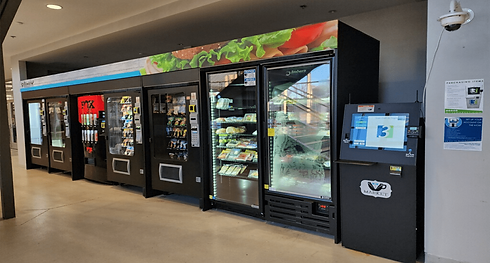
A micro market is a modern, self-service retail space designed to offer snacks, beverages, fresh food, salads, sandwiches and meals in places like offices, schools, hospitals, or luxury apartment buildings. Unlike traditional vending machines, micro markets look and feel more like a mini convenience stores. They feature open shelves, coolers, and displays where people can freely browse and select what they want.
"Stores that don't offer the ease of checkout-free shopping and personalized tips customers want may struggle to compete." -Jerome Glenn, CEO of the Millennium Project"
The Unattended Retail Leader
Changing the way customers shop
How does a Micro Market work?
In a micro market, customers pick out their items and pay at a self-checkout kiosk. These kiosks usually accept credit cards, mobil payments, or even employee badges. The process is quick and easy--no need for cash or coins. Security cameras are often used to keep the area safe and honest, but the atmosphere is relaxed and trusting.



Who Benefits from a Micro Market?
Business
Higher productivity and lower time loss:
Employees stay on-site for coffee, snacks, and meals instead of driving off-campus, which reduces time away from work and can support better focus afterward.
Stronger culture and employer brand:
Providing a modern market with fresh, healthy, and premium options is seen as a high‑value perk that helps with retention and recruitment.
Better decisions with data:
Real‑time sales and product analytics show what sells, peak times, and ideal pricing, improving margins and reducing waste.
Employees
Convenient access to real food:
Staff get quick access to snacks, drinks, and full meals (salads, wraps, sandwiches, yogurt, fruit) without leaving the building or dealing with long lines off-site.
Faster, self-directed shopping:
People can pick up and examine items, then pay quickly at a kiosk with cashless or contactless payments, reducing queues and friction.
Better breakroom experience:
The space feels more like a small café or convenience store, which improves morale and creates a more modern, employee-focused environment.
Breakroom
Always on-site access:
Guests, residents, or patients can buy items any time (early morning, late night, weekends) without needing staff to run a counter.
Transforms the breakroom into a social hub:
An open, store‑like setup encourages people from different teams to gather, talk, and share breaks, which supports collaboration and a more positive atmosphere.
Cleaner, more functional space:
Organized shelves, coolers, and self-checkout technology replace cluttered counters and old vending machines, helping the breakroom feel like a small café rather than an afterthought.
Process of Installation
1. Submit plans for approval
Contact locations local health department and submit a plan review application with two copies of detailed plans.
2. On-site construction inspection
After plan approval, install equipment per the approved layout, then schedule a final inspection. Inspectors verify temperatures, sanitation, signage with owner details, and no pre-stocked food until approved.
3. Obtain health permit from city
Any Vending pays the permit fee upon passing inspection to operate legally. Post the permit visibly and comply with annual inspections covering food sources, cleanliness, and surveillance.
4. Pre-installation planning
Assess the site for space, electrical outlets, internet access, and compliance with health codes. Create a product catalog and secure vendor approvals like card reader activation. Design layout grouping items logically and confirming power/internet readiness.
5. Physical equipment installation
Unbox and position kiosks, shelves, coolers, and racks; plug in power and connect to Ethernet or Wi-Fi.Assemble fixtures securely, ensuring refrigeration units maintain proper temperatures for fresh items.
6. Software and kiosk setup
Input owner credentials into the kiosk app.Run hardware tests for scanners, payments, and connectivity; calibrate screens and verify product scanning.
7. Initial stocking and testing
Stock with a balanced mix from your catalog, prioritizing high-turnover items and labeling clearly. Test full transactions, monitor telemetry for inventory alerts, and train site contacts.
8. Go-live and ongoing support
Launch with promotions, then use remote dashboards for sales tracking, restocking schedules, and adjustments. Any Vending handles weekly visits for replenishment, with cloud alerts minimizing issues.